
A developer opens a pull request that needs a second pair of eyes before the release goes out. Nobody sees it. Not because the team doesn't care, but because the Slack channel already got muted three weeks ago after GitHub's default notifications turned it into a wall of "synchronize," "assigned," and "review_requested" messages nobody could keep up with.
That's the real problem with connecting GitHub to Slack: it's easy to get some notification working, and much harder to get only the right notifications working. This guide builds both — a working automation in n8n, and a filtering layer that stops the exact kind of noise that gets channels muted in the first place.
Every step below tells you exactly what to click and where. No n8n or GitHub webhook experience required.
What This Automation Actually Does
Here's the short version before the step-by-step begins:
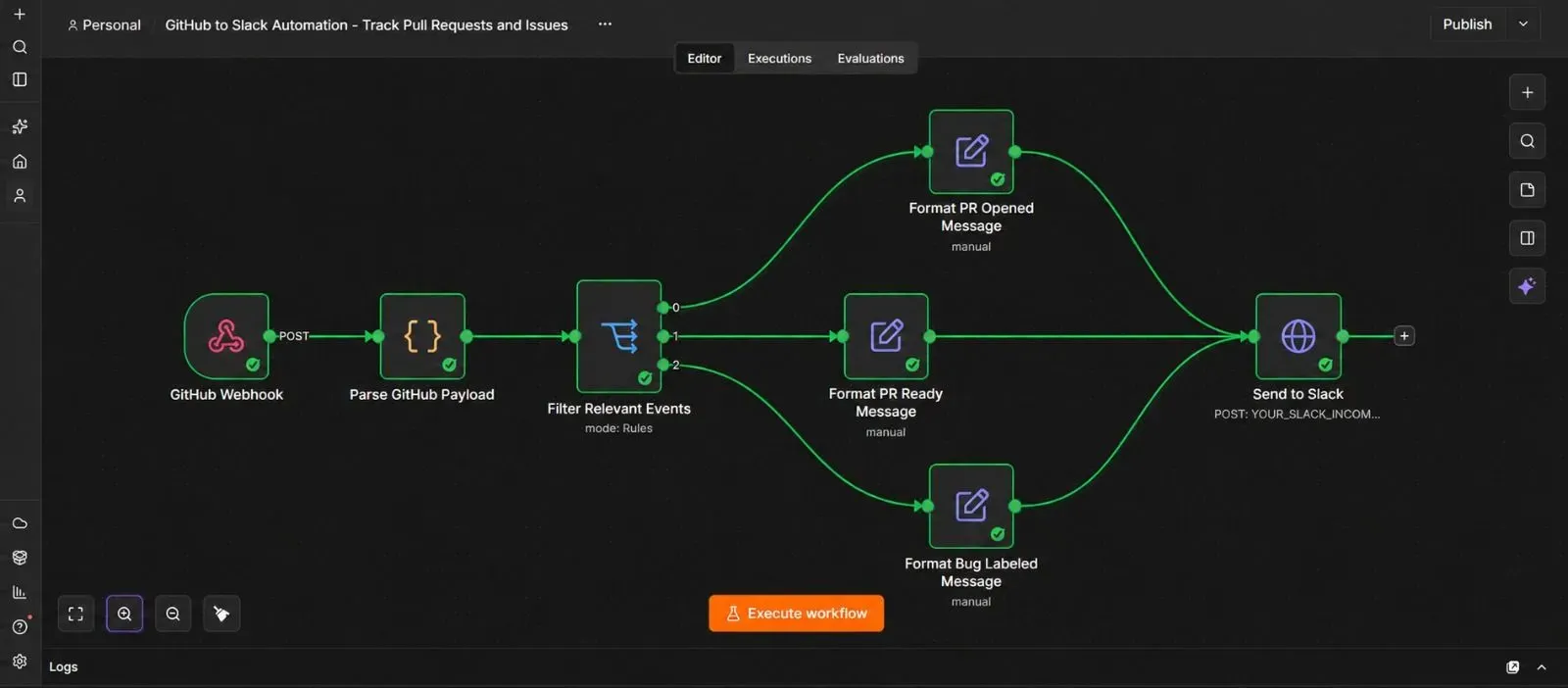
Something happens on GitHub (a pull request opens, or an issue gets labeled "bug") → GitHub sends that event to n8n → n8n checks whether this specific event actually matters to your team → if it does, n8n builds a clean, readable message and posts it to your Slack channel → if it doesn't, n8n quietly ignores it.
That last part — the filtering — is what keeps this useful instead of annoying.
Why Filtering Matters More Than the Connection Itself
GitHub doesn't send one webhook per pull request. It sends one webhook for every single change to that pull request — opened, a new commit pushed, a label added, a reviewer assigned, a comment posted, closed, reopened, and more. A single active PR can easily fire ten or more separate webhook calls before it's merged.
If your automation posts a Slack message for every one of those, the channel becomes exactly as noisy as GitHub's default notifications, just with extra steps. The fix isn't turning off notifications — it's deciding upfront which specific events actually need a human's attention, and filtering out the rest before a message ever gets sent.
What You'll Need Before You Start
| Requirement | What it's for | Where to get it |
|---|---|---|
| Admin access to a GitHub repository | Lets you add a webhook | Your existing GitHub account |
| A Slack workspace and channel | Where the messages land | Your existing Slack account |
| A Slack Incoming Webhook URL | Lets n8n post messages into that channel | Slack's App Directory |
| An n8n instance (Cloud or self-hosted) | Runs the automation | n8n.io |
Set all four up before starting. GitHub's webhook step in particular needs a live n8n webhook URL already running, so build the n8n side first.
Step 1 — Create a Slack Incoming Webhook
- Go to api.slack.com/apps and click Create New App.
- Choose From scratch, give it a name like "GitHub Notifier," and select your workspace.
- In the left sidebar, click Incoming Webhooks, and switch the toggle to On.
- Click Add New Webhook to Workspace, choose the channel you want GitHub updates posted to, and click Allow.
- Copy the Webhook URL that appears — you'll need it in Step 6.
Step 2 — Add a Webhook Trigger in n8n
- Open a new, blank workflow in n8n.
- Click Add first step, search for "Webhook," and add it.
- Set the HTTP Method to POST.
- Set the Path to something recognizable, like
github-events. - Set Respond to Immediately, so GitHub gets a quick confirmation instead of waiting on the rest of the workflow.
- Copy the Production URL shown at the top of the node — this is what GitHub will send data to.
Step 3 — Connect the Webhook to GitHub
- Go to your GitHub repository, click Settings, then Webhooks in the left sidebar.
- Click Add webhook.
- Paste the n8n Production URL from Step 2 into the Payload URL field.
- Set Content type to
application/json. - Under Which events would you like to trigger this webhook?, choose Let me select individual events, and check only:
- Pull requests
- Issues
- Leave everything else unchecked — this is the first layer of filtering, done right at the source instead of after the fact.
- Make sure Active is checked, then click Add webhook.
Step 4 — Confirm GitHub Can Reach n8n
- Trigger a small test — open a new pull request, or add a comment to an existing issue.
- In GitHub, go back to Settings → Webhooks, click on the webhook you just created, and scroll to Recent Deliveries.
- Click on the most recent delivery. A green checkmark means GitHub successfully reached your n8n webhook.
- Back in n8n, click into your Webhook node's execution — you should see the full GitHub payload sitting there.
If you see a red X in GitHub's Recent Deliveries instead, double-check the Payload URL was copied exactly, with no extra spaces.
Step 5 — Understand and Parse the GitHub Payload
This is the section this guide is really about, so it's worth slowing down here.
GitHub sends two important pieces of information with every webhook call:
- A header called
X-GitHub-Event, telling you the general category —pull_requestorissues. - A field inside the body called
action, telling you exactly what happened within that category —opened,synchronize,closed,labeled,assigned, and others.
You need both pieces together to filter correctly. Knowing it's a pull_request event isn't enough on its own — you specifically want the opened action, not the synchronize action that fires every time someone pushes a new commit to that same PR.
- Click + after the Webhook node, search for "Code," and add it. Name it "Parse GitHub Payload."
- Set the language to JavaScript.
- Use this logic to pull out exactly what you need:
const eventType = $json.headers['x-github-event'];
const action = $json.body.action;

let title = "";
let url = "";
let actor = "";
let labels = [];

if (eventType === "pull_request") {
  title = $json.body.pull_request.title;
  url = $json.body.pull_request.html_url;
  actor = $json.body.sender.login;
  labels = $json.body.pull_request.labels.map(l => l.name);
} else if (eventType === "issues") {
  title = $json.body.issue.title;
  url = $json.body.issue.html_url;
  actor = $json.body.sender.login;
  labels = $json.body.issue.labels.map(l => l.name);
}

return {
  json: {
    eventType,
    action,
    title,
    url,
    actor,
    labels,
    repository: $json.body.repository.full_name
  }
};
Test the step using the real delivery from Step 4. You should see clean fields for eventType, action, title, url, actor, and labels.
Step 6 — Filter Out Everything Your Team Doesn't Need to See
Now decide, on purpose, what actually deserves a Slack message. A reasonable starting rule set:
| Event | Action | Send to Slack? |
|---|---|---|
| Pull request | opened | Yes — a new PR needs review |
| Pull request | ready_for_review | Yes — it just came out of draft |
| Pull request | synchronize | No — fires on every single commit push |
| Pull request | closed | Optional — useful if you want merge confirmations |
| Issue | opened | Optional — can be noisy on active repos |
| Issue | labeled, with label bug | Yes — this is the "someone needs to look at this" signal |
- Click +, search for "Switch," and add it. Name it "Filter Relevant Events."
- Set Mode to Rules, and add rule branches matching the table above — for example, one rule where
eventTypeequalspull_requestANDactionequalsopened, and another whereeventTypeequalsissuesANDactionequalslabeledANDlabelscontainsbug. - Leave the fallback output disconnected, or connect it to nothing at all — anything that doesn't match a rule simply stops here instead of reaching Slack.
This is the actual anti-spam mechanism. Everything before this step just gathers information; this step decides what's worth interrupting someone's day for.
Step 7 — Build a Clean, Actionable Slack Message
- Add a Set node after each relevant Switch output, named "Format Slack Message."
- Create a single field called
slack_text, combining the parsed fields into a readable line, for example:🔔 New PR: {{ $json.title }} — opened by {{ $json.actor }}\n{{ $json.url }} - Repeat this for the bug-labeled branch with its own wording, for example:
🐞 Bug labeled: {{ $json.title }}\n{{ $json.url }}
Keeping the message short and including the direct link means nobody has to leave Slack and go hunting through GitHub to know what happened.
Step 8 — Send the Message to Slack
- Click + after the Format Slack Message node, search for "HTTP Request," and add it. Name it "Send to Slack."
- Set the method to POST.
- Paste your Slack Incoming Webhook URL from Step 1 into the URL field.
- Turn on Send Body, set it to JSON, and add one field:
text→ yourslack_textfield
- Connect both formatting branches (PR opened and bug labeled) into this same Send to Slack node, so every relevant event ends up going through one consistent posting step.
- Test the step — the message should appear in your Slack channel within seconds.
Step 9 — Test With a Real Pull Request and a Real Bug Label
- Open an actual pull request in your repository and confirm a clean message appears in Slack.
- Push a small extra commit to that same PR, and confirm nothing new posts — this proves the
synchronizefiltering from Step 6 is actually working. - Add a
buglabel to an existing issue, and confirm that message appears too.
If a message doesn't appear when it should, check the Switch node's rule conditions first — this is almost always where a small typo (like Pull_request instead of pull_request) causes a silent mismatch.
Step 10 — Activate the Workflow
- Click the Active toggle in the top right corner of the n8n canvas.
- Confirm it switches on.
- From this point on, GitHub events flow into n8n and filtered results land in Slack automatically, with no editor window needed.
The Downloadable Template
A ready-to-import version of this workflow is included below, so you don't have to build every node from scratch. It ships with clearly labeled placeholders for your own Slack webhook URL.
How to install it:
- Open n8n and start a new, blank workflow.
- Click the three dots menu in the top right corner.
- Select Import from File.
- Choose the downloaded .json file.
- Open the Webhook node to get your own Production URL, add it to your GitHub repository as in Step 3, and paste your Slack Incoming Webhook URL into the Send to Slack node.
{
  "name": "GitHub to Slack Automation - Track Pull Requests and Issues",
  "nodes": [
    {
      "parameters": {
        "httpMethod": "POST",
        "path": "github-events",
        "responseMode": "onReceived",
        "options": {}
      },
      "id": "node-webhook",
      "name": "GitHub Webhook",
      "type": "n8n-nodes-base.webhook",
      "typeVersion": 2,
      "position": [0, 0]
    },
    {
      "parameters": {
        "language": "javaScript",
        "jsCode": "const eventType = $json.headers['x-github-event'];\nconst action = $json.body.action;\n\nlet title = \"\";\nlet url = \"\";\nlet actor = \"\";\nlet labels = [];\n\nif (eventType === \"pull_request\") {\n  title = $json.body.pull_request.title;\n  url = $json.body.pull_request.html_url;\n  actor = $json.body.sender.login;\n  labels = $json.body.pull_request.labels.map(l => l.name);\n} else if (eventType === \"issues\") {\n  title = $json.body.issue.title;\n  url = $json.body.issue.html_url;\n  actor = $json.body.sender.login;\n  labels = $json.body.issue.labels.map(l => l.name);\n}\n\nreturn {\n  json: {\n    eventType,\n    action,\n    title,\n    url,\n    actor,\n    labels,\n    repository: $json.body.repository.full_name\n  }\n};"
      },
      "id": "node-parse-payload",
      "name": "Parse GitHub Payload",
      "type": "n8n-nodes-base.code",
      "typeVersion": 2,
      "position": [220, 0]
    },
    {
      "parameters": {
        "mode": "rules",
        "rules": {
          "values": [
            {
              "conditions": {
                "conditions": [
                  { "leftValue": "={{ $json.eventType }}", "rightValue": "pull_request", "operator": { "type": "string", "operation": "equals" } },
                  { "leftValue": "={{ $json.action }}", "rightValue": "opened", "operator": { "type": "string", "operation": "equals" } }
                ],
                "combinator": "and"
              },
              "outputKey": "PR Opened"
            },
            {
              "conditions": {
                "conditions": [
                  { "leftValue": "={{ $json.eventType }}", "rightValue": "pull_request", "operator": { "type": "string", "operation": "equals" } },
                  { "leftValue": "={{ $json.action }}", "rightValue": "ready_for_review", "operator": { "type": "string", "operation": "equals" } }
                ],
                "combinator": "and"
              },
              "outputKey": "PR Ready for Review"
            },
            {
              "conditions": {
                "conditions": [
                  { "leftValue": "={{ $json.eventType }}", "rightValue": "issues", "operator": { "type": "string", "operation": "equals" } },
                  { "leftValue": "={{ $json.action }}", "rightValue": "labeled", "operator": { "type": "string", "operation": "equals" } },
                  { "leftValue": "={{ $json.labels }}", "rightValue": "bug", "operator": { "type": "array", "operation": "contains" } }
                ],
                "combinator": "and"
              },
              "outputKey": "Bug Labeled"
            }
          ]
        },
        "fallbackOutput": "none",
        "options": {}
      },
      "id": "node-filter-events",
      "name": "Filter Relevant Events",
      "type": "n8n-nodes-base.switch",
      "typeVersion": 3.2,
      "position": [440, 0]
    },
    {
      "parameters": {
        "assignments": {
          "assignments": [
            {
              "id": "s1",
              "name": "slack_text",
              "value": "={{ '🔔 New PR: ' + $json.title + ' — opened by ' + $json.actor + '\\n' + $json.url }}",
              "type": "string"
            }
          ]
        },
        "options": {}
      },
      "id": "node-format-pr-opened",
      "name": "Format PR Opened Message",
      "type": "n8n-nodes-base.set",
      "typeVersion": 3.4,
      "position": [660, -200]
    },
    {
      "parameters": {
        "assignments": {
          "assignments": [
            {
              "id": "s2",
              "name": "slack_text",
              "value": "={{ '👀 PR ready for review: ' + $json.title + ' — by ' + $json.actor + '\\n' + $json.url }}",
              "type": "string"
            }
          ]
        },
        "options": {}
      },
      "id": "node-format-pr-ready",
      "name": "Format PR Ready Message",
      "type": "n8n-nodes-base.set",
      "typeVersion": 3.4,
      "position": [660, 0]
    },
    {
      "parameters": {
        "assignments": {
          "assignments": [
            {
              "id": "s3",
              "name": "slack_text",
              "value": "={{ '🐞 Bug labeled: ' + $json.title + '\\n' + $json.url }}",
              "type": "string"
            }
          ]
        },
        "options": {}
      },
      "id": "node-format-bug-labeled",
      "name": "Format Bug Labeled Message",
      "type": "n8n-nodes-base.set",
      "typeVersion": 3.4,
      "position": [660, 200]
    },
    {
      "parameters": {
        "method": "POST",
        "url": "YOUR_SLACK_INCOMING_WEBHOOK_URL",
        "sendBody": true,
        "specifyBody": "json",
        "jsonBody": "={{ JSON.stringify({ text: $json.slack_text }) }}"
      },
      "id": "node-send-slack",
      "name": "Send to Slack",
      "type": "n8n-nodes-base.httpRequest",
      "typeVersion": 4.2,
      "position": [880, 0]
    }
  ],
  "connections": {
    "GitHub Webhook": {
      "main": [[{ "node": "Parse GitHub Payload", "type": "main", "index": 0 }]]
    },
    "Parse GitHub Payload": {
      "main": [[{ "node": "Filter Relevant Events", "type": "main", "index": 0 }]]
    },
    "Filter Relevant Events": {
      "main": [
        [{ "node": "Format PR Opened Message", "type": "main", "index": 0 }],
        [{ "node": "Format PR Ready Message", "type": "main", "index": 0 }],
        [{ "node": "Format Bug Labeled Message", "type": "main", "index": 0 }],
        []
      ]
    },
    "Format PR Opened Message": {
      "main": [[{ "node": "Send to Slack", "type": "main", "index": 0 }]]
    },
    "Format PR Ready Message": {
      "main": [[{ "node": "Send to Slack", "type": "main", "index": 0 }]]
    },
    "Format Bug Labeled Message": {
      "main": [[{ "node": "Send to Slack", "type": "main", "index": 0 }]]
    }
  },
  "pinData": {},
  "meta": {
    "instanceId": "github-to-slack-automation-template"
  }
}
Common Mistakes to Avoid
- Choosing "Send me everything" in GitHub's webhook settings. This defeats the filtering built into this workflow before the data even reaches n8n — always select individual events instead.
- Filtering only on
eventTypeand notaction. Every pull request generates apull_requestevent no matter what happened to it — theactionfield is what tellsopenedapart fromsynchronize. - Case-sensitive typos in Switch node rules. GitHub's action values are lowercase (
opened, notOpened) — a mismatched case silently fails the rule instead of throwing a visible error. - Skipping the Recent Deliveries check in Step 4. If GitHub can't reach n8n, nothing downstream ever runs, and there's no obvious error message pointing you back to that specific cause.
- Building a single message format for every event type. A pull request and a bug label need different wording — reusing one template for both makes messages confusing to scan quickly.
Frequently Asked Questions
Yes. Use a separate Slack Incoming Webhook URL for each channel, and route each Switch node branch to its own "Send to Slack" step using the matching URL.
Add another Switch rule checking for eventType equals pull_request, action equals closed, and the field pull_request.merged equals true — this distinguishes an actual merge from a PR that was simply closed without merging.
GitHub does attempt redelivery on failure, and you can also manually trigger a redelivery from the Recent Deliveries screen in Step 4 if a specific event needs to be reprocessed.
Yes. The parsed repository field from Step 5 can be added to your Switch node rules, which is useful if one n8n workflow handles webhooks from more than one repository.
GitHub's built-in Slack app works fine for simple cases, but it doesn't let you filter by specific actions or labels the way this workflow does — that filtering step is the whole reason to build it in n8n instead.
Leave a Comment
Your comment is completely private and secure. We never publish comments publicly on our website. Your message will be sent directly to our team.