
Someone posts a complaint about your product on a subreddit nobody on your team checks regularly. Three days later, it has forty comments and a screenshot floating around Twitter, and the first anyone on the community team hears about it is from a customer asking why nobody responded. The original post, if someone had seen it within the first hour, would have taken five minutes to resolve.
This guide builds an automation that closes that gap. The moment your brand name gets mentioned on Reddit, a formatted alert lands directly in a Discord channel, with a link straight to the post. No manual searching, no scraping tools, and no need to check Reddit throughout the day just in case.
This guide's specific technical focus covers three things that trip people up the first time they build something like this: reading Reddit's built-in RSS feeds instead of scraping the site directly, filtering out irrelevant matches, and formatting a Discord message that actually looks clean instead of a wall of raw text.
Every step below is written for someone who has never opened n8n before.
What This Automation Actually Does
Here's the short version before the steps begin:
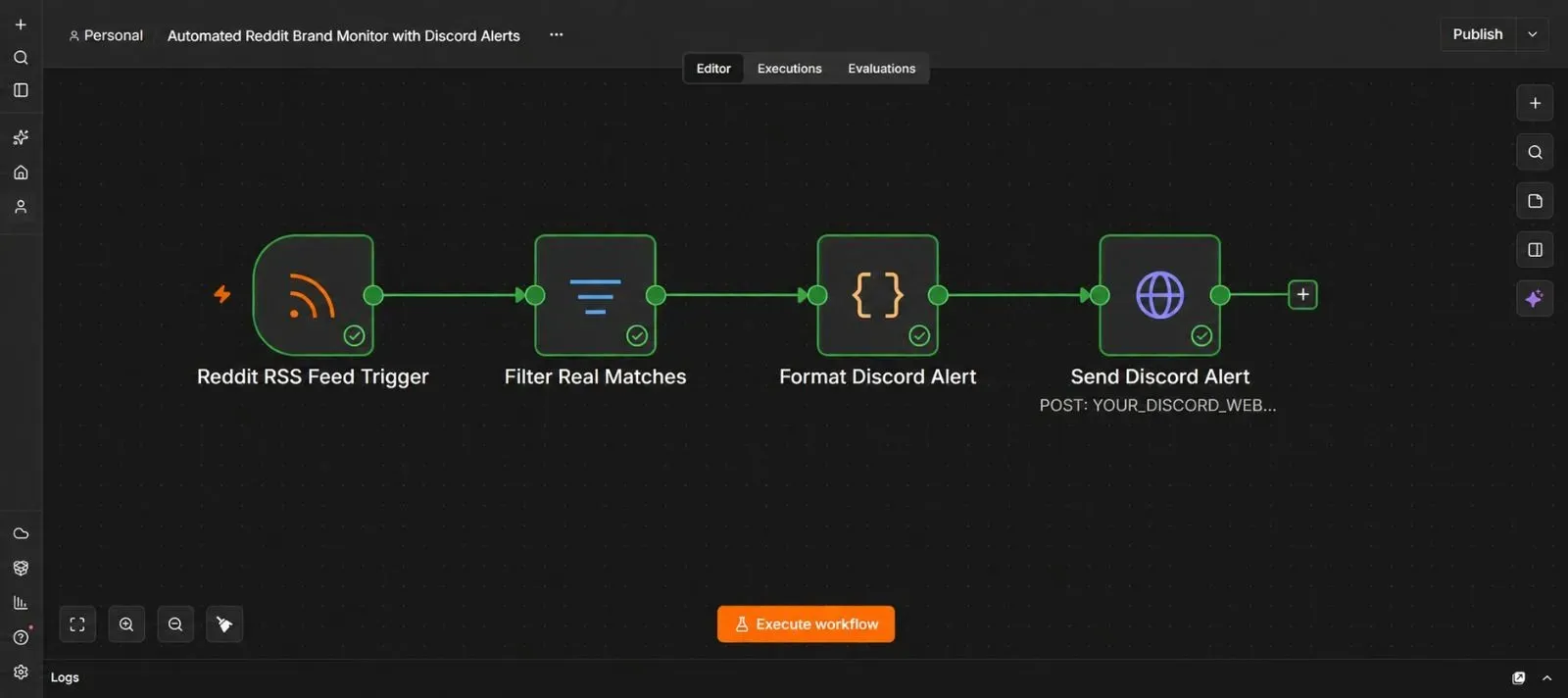
n8n checks Reddit's RSS feed for new posts matching your brand keyword → any genuinely new post gets double-checked to confirm it's a real match → n8n builds a clean, readable alert with the post's title, a link, and a short preview → that alert gets posted straight into your Discord channel.
Why This Guide Uses RSS Instead of Scraping Reddit Directly
It's worth explaining this before building anything, since it's the reason this workflow is far simpler than it might sound.
Reddit already provides a built-in feed of new posts matching a search — you don't need to scrape the site's HTML or fight against anti-bot protections at all. Any Reddit search can be turned into an RSS feed just by adding .rss to the end of the URL. RSS is a simple, standardized format websites use to publish "what's new here," and n8n has a built-in node that reads these feeds directly.
This matters because scraping a website's actual page content is fragile — it breaks the moment the site's design changes — while RSS feeds are a stable, intended way for outside tools to check for new content. Using Reddit's own feed instead of scraping its pages is both easier to build and far less likely to stop working after a site redesign.
What You'll Need Before You Start
| Requirement | What it's for | Where to get it |
|---|---|---|
| A Discord server you can manage | Where alerts get posted | Your existing Discord account |
| An n8n instance (Cloud or self-hosted) | Runs the automation | n8n.io |
| Your brand name or keyword(s) to monitor | What the workflow searches Reddit for | Just decide this before starting |
No Reddit account or API key is required for this particular approach, since RSS feeds are publicly readable.
Step 1 — Create a Discord Webhook
- In your Discord server, go to Server Settings → Integrations.
- Click Webhooks, then New Webhook.
- Name it something like "Brand Monitor," and choose which channel it should post into.
- Click Copy Webhook URL, and save it somewhere safe — you'll paste it into n8n later.
Step 2 — Build Your Reddit RSS Feed URL
- Go to Reddit and search for your brand name using the search bar, just to confirm the kind of results that come up.
- To monitor mentions across all of Reddit, use this URL pattern, replacing the keyword with your own:
https://www.reddit.com/search.rss?q=YourBrandName&sort=new - To monitor a specific subreddit instead, use this pattern:
https://www.reddit.com/r/SubredditName/search.rss?q=YourBrandName&restrict_sr=on&sort=new - Paste either URL directly into a browser tab first, and confirm it loads a page of raw feed data (it'll look like plain text with XML tags) rather than an error page.
💡 A quick note on watching several specific subreddits at once: each RSS feed URL can only cover one search at a time, so monitoring three specific subreddits means building three separate feed URLs and combining their results later in n8n (covered in Step 4).
Step 3 — Add the RSS Feed Trigger in n8n
- Open a new, blank workflow in n8n.
- Click Add first step, search for "RSS Feed Trigger," and add it.
- Paste your feed URL from Step 2 into the Feed URL field.
- Set a Poll interval — checking every 10–15 minutes is usually frequent enough for brand monitoring without hammering Reddit's servers.
- Test the step. If posts already exist matching your keyword, you should see them come through with a title, link, and publish date.
💡 This node only fires for new items. Unlike a plain RSS reader, the Trigger version keeps track of what it's already seen and only passes along posts published since the last check — this is what prevents the same Reddit post from re-triggering an alert every time n8n polls the feed.
Step 4 — Monitoring Multiple Subreddits (Optional)
If you built several feed URLs in Step 2 for different subreddits, add one RSS Feed Trigger node per subreddit, each pointed at its own feed URL. Then add a Merge node set to Append, connecting all of the RSS triggers into it, so every subreddit's results flow into one combined stream before continuing to the next steps.
If a single sitewide feed covers your needs, skip this step entirely and continue with just the one trigger from Step 3.
Step 5 — Filter Out Loose or Irrelevant Matches
Reddit's search can occasionally return posts that technically contain your keyword but aren't really about your brand — a common name that overlaps with an unrelated word, for example. Adding a filter here catches those before they turn into a false alert.
- Click +, search for "Filter," and add it.
- Add a condition checking that the post's
titlefield contains your exact brand keyword (set the comparison to be case-insensitive if your brand name has unusual capitalization). - If your brand name is a common word that causes a lot of unrelated matches, consider adding an additional condition — for example, requiring the title to also mention your product category, or excluding posts containing a specific unrelated term you keep seeing show up by mistake.
- Test the step with a mix of real feed results, and confirm only genuinely relevant posts pass through.
Step 6 — Build a Clean Discord Alert Message
This is the second major focus of this guide — Discord doesn't just accept a message; it has a specific structure for messages that include a nicely formatted preview box (called an embed), and getting that structure right is what makes the difference between a clean-looking alert and a broken one.
- Add a Code node, name it "Format Discord Alert."
- Set the language to JavaScript, and use logic like this:
const title = $json.title.length > 250
  ? $json.title.substring(0, 250) + "..."
  : $json.title;

const description = ($json.contentSnippet || "No preview available.").length > 300
  ? $json.contentSnippet.substring(0, 300) + "..."
  : ($json.contentSnippet || "No preview available.");

return {
  json: {
    embed: {
      title: title,
      url: $json.link,
      description: description,
      color: 16729413, // decimal equivalent of a red-orange hex color
      footer: {
        text: "Reddit Brand Mention"
      },
      timestamp: new Date($json.pubDate).toISOString()
    }
  }
};
💡 A few details worth understanding here:
- Discord's embed fields have character limits (titles around 256 characters, descriptions around 4096), so trimming longer text with
substring()avoids Discord silently rejecting an overly long message. - Discord's
colorfield expects a plain decimal number, not a hex code like#FF4500. If you want a specific color, convert its hex value to decimal first (searching "hex to decimal color converter" gives you a quick tool for this) and use that number instead. - The
timestampfield needs to be in a very specific format (ISO 8601), which is why the code explicitly converts the post's publish date using.toISOString()rather than passing the raw date through as-is.
Step 7 — Send the Alert to Discord
- Click +, search for "HTTP Request," and add it. Name it "Send Discord Alert."
- Set the method to POST.
- Paste your Discord Webhook URL from Step 1 into the URL field.
- Turn on Send Body, set it to JSON, and structure it as:
{
  "embeds": [
    "={{ $json.embed }}"
  ]
}
Test the step — a formatted alert card should appear in your Discord channel within seconds, showing the post's title as a clickable link, a short preview, and a colored side bar.
Step 8 — Test With a Real Mention
- If your brand is mentioned somewhere on Reddit recently, wait for the next poll cycle and confirm the alert appears correctly.
- If not, temporarily test with a broader or more common keyword (like a well-known brand name) just to confirm the full chain works, then switch the keyword back to your actual brand once you've verified everything.
- Check that the Discord alert shows a real title, a working link back to the actual post, and a readable preview.
Step 9 — Activate the Workflow
- Click the Active toggle in the top right corner of the n8n canvas.
- Confirm it switches on.
From here, every new Reddit mention gets caught and posted to Discord automatically, on whatever polling schedule you set in Step 3.
The Downloadable Template
A ready-to-import version of this workflow is included below, with a clearly labeled placeholder for your keyword, feed URL, and Discord webhook.
How to install it:
- Open n8n and start a new, blank workflow.
- Click the three dots menu in the top right corner.
- Select Import from File.
- Choose the downloaded
.jsonfile. - Update the feed URL with your own brand keyword, and paste in your Discord Webhook URL.
{
  "name": "Automated Reddit Brand Monitor with Discord Alerts",
  "nodes": [
    {
      "parameters": {
        "feedUrl": "https://www.reddit.com/search.rss?q=YourBrandName&sort=new",
        "pollTimes": { "item": [{ "mode": "everyX", "value": 15, "unit": "minutes" }] }
      },
      "id": "node-rss-trigger",
      "name": "Reddit RSS Feed Trigger",
      "type": "n8n-nodes-base.rssFeedReadTrigger",
      "typeVersion": 1,
      "position": [0, 0]
    },
    {
      "parameters": {
        "conditions": {
          "conditions": [
            {
              "leftValue": "={{ $json.title.toLowerCase() }}",
              "rightValue": "yourbrandname",
              "operator": { "type": "string", "operation": "contains" }
            }
          ]
        },
        "options": {}
      },
      "id": "node-filter-matches",
      "name": "Filter Real Matches",
      "type": "n8n-nodes-base.filter",
      "typeVersion": 2.2,
      "position": [220, 0]
    },
    {
      "parameters": {
        "language": "javaScript",
        "jsCode": "const title = $json.title.length > 250\n  ? $json.title.substring(0, 250) + \"...\"\n  : $json.title;\n\nconst rawDescription = $json.contentSnippet || \"No preview available.\";\nconst description = rawDescription.length > 300\n  ? rawDescription.substring(0, 300) + \"...\"\n  : rawDescription;\n\nreturn {\n  json: {\n    embed: {\n      title: title,\n      url: $json.link,\n      description: description,\n      color: 16729413,\n      footer: {\n        text: \"Reddit Brand Mention\"\n      },\n      timestamp: new Date($json.pubDate).toISOString()\n    }\n  }\n};"
      },
      "id": "node-format-alert",
      "name": "Format Discord Alert",
      "type": "n8n-nodes-base.code",
      "typeVersion": 2,
      "position": [440, 0]
    },
    {
      "parameters": {
        "method": "POST",
        "url": "YOUR_DISCORD_WEBHOOK_URL",
        "sendBody": true,
        "specifyBody": "json",
        "jsonBody": "={{ JSON.stringify({ embeds: [ $json.embed ] }) }}"
      },
      "id": "node-send-discord",
      "name": "Send Discord Alert",
      "type": "n8n-nodes-base.httpRequest",
      "typeVersion": 4.2,
      "position": [660, 0]
    }
  ],
  "connections": {
    "Reddit RSS Feed Trigger": {
      "main": [[{ "node": "Filter Real Matches", "type": "main", "index": 0 }]]
    },
    "Filter Real Matches": {
      "main": [[{ "node": "Format Discord Alert", "type": "main", "index": 0 }]]
    },
    "Format Discord Alert": {
      "main": [[{ "node": "Send Discord Alert", "type": "main", "index": 0 }]]
    }
  },
  "pinData": {},
  "meta": {
    "instanceId": "reddit-brand-monitor-template"
  }
}
Common Mistakes to Avoid
- Polling too frequently. Checking every minute doesn't get you meaningfully faster alerts than checking every 10–15 minutes, and hitting Reddit's feed too often risks temporary rate limiting.
- Skipping the Filter step for a common brand name. If your brand shares a name with an everyday word, this step is what keeps the channel from filling up with unrelated posts.
- Sending a hex color code directly into Discord's
colorfield. Discord expects a decimal number, and a hex string in that field is typically ignored or rendered as no color at all. - Forgetting to convert the post's date to ISO format. Discord's timestamp field can silently fail to render if the date isn't formatted exactly as it expects.
- Not testing with a real or common keyword first. If your actual brand hasn't been mentioned recently, it's easy to mistake "no matches yet" for "the workflow is broken."
Frequently Asked Questions
No. Reddit's RSS feeds are publicly accessible without logging in or registering for API access, which is what makes this approach simpler to set up than Reddit's full API.
Yes. Either combine both terms in one search URL using Reddit's search syntax, or set up a separate RSS Feed Trigger for each keyword and merge them, the same way described in Step 4 for multiple subreddits.
Yes. Slack's incoming webhooks accept a similarly structured JSON body — you'd adjust the Code node's output format slightly to match Slack's block or attachment structure instead of Discord's embed structure.
Double-check your search URL loads correctly in a browser first, as shown in Step 2 — a small typo in the keyword or subreddit name is the most common cause.
Reddit's search RSS feeds primarily surface matching posts rather than individual comments — for comment-level monitoring, you'd need a different data source, such as Reddit's official API with comment search enabled.
Leave a Comment
Your comment is completely private and secure. We never publish comments publicly on our website. Your message will be sent directly to our team.